
Vendor review findings and the Risk Register ('Add to Register')
Findings are risks the platform flags for you automatically from a vendor review — one set from a submitted questionnaire, another from an uploaded report once it's been classified. They're suggestions, not tracked risks. Add to Register is the button that promotes a single finding into a tracked risk in your Risk Management module, and nothing moves until you click it. You decide what becomes a tracked risk — that's deliberate, not a gap.
Where findings come from
Findings appear under Notable Findings in a vendor review. Two sources feed it, both automatic:
- From a submitted questionnaire. When a questionnaire is fully answered and submitted, the platform reads the answers and generates findings. These land on the From questionnaire tab.
- From an uploaded report. When you upload a report, the platform first works out what kind of document it is, then generates findings from its contents. These land on the report's own tab, named for the document type the platform detected (a SOC 2 report, for example). A report produces findings only after that classification finishes, so give a fresh upload a moment before you expect them.
You don't trigger findings — they generate on their own once the questionnaire is in or the report is classified. Each finding shows a name, a short description, and a risk level.
How to triage a finding
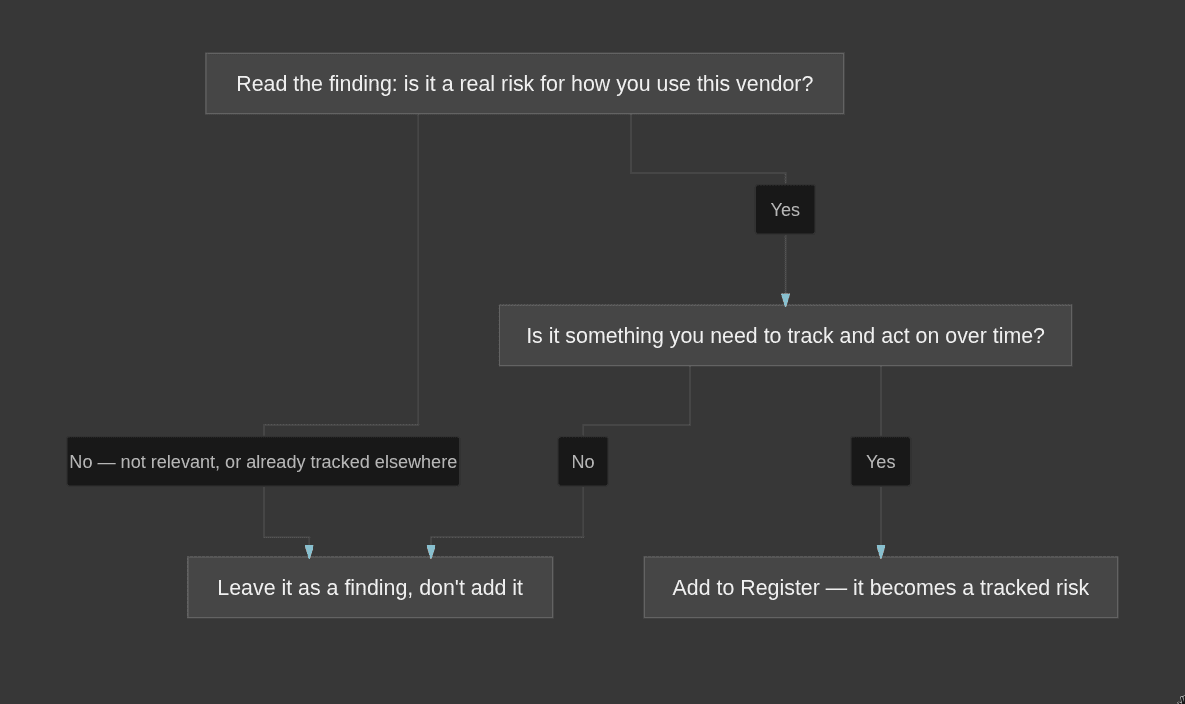
Read each finding and make one call: is this a real risk you need to track? A finding is the platform pointing at something worth a look — it isn't a verdict. Some are genuine risks you want on record; others are noise for how you actually use the vendor, or things you already track elsewhere.
What "Add to Register" does
Add to Register promotes one finding into a tracked risk in your Risk Management module. Once promoted, it lives alongside your other risks — you can assign it, work it, and track it to closure like any risk — and it also shows up on the vendor's own risks view.
Until you click it, a finding stays a suggestion. It's visible inside the review, but it is not a tracked risk and it won't appear in your register. Findings are never promoted for you — you choose which ones matter enough to track. An auditor wants your judgment on what counts as a real vendor risk, not a tool dumping every flag into your register, so this step is human on purpose.
Findings don't change your test results
The vendor tests don't read your findings or your register at all. Adding a finding to the register won't turn a failing test green, and leaving one alone won't make a test fail. Findings support the vendor risk-assessment your auditor expects you to have documented — the record that you looked at each vendor's risks and made a call — not any test's pass or fail. To move the vendor tests, complete reviews and upload the right reports; to strengthen your risk documentation, triage your findings and add the real ones.
Common mistakes
- Waiting for findings to promote themselves. They never do. If a finding matters, click Add to Register — nothing happens to it otherwise.
- Adding every finding. A padded register is as unhelpful as an empty one. Promote the risks you'll actually track; leave the rest as findings.
- Expecting a finding to fix a test. Findings and the vendor tests are separate. A finding never changes a pass or fail.