
What is UprootSecurity, and how do I get to audit-ready?
UprootSecurity turns the framework you're being audited against into a set of checks that run themselves. It maintains the controls and the tests, re-runs every test daily against the tools you've connected and the records you keep here, and files the evidence as it goes — so when your auditor arrives you hand over a finished body of proof instead of assembling one. Audit-ready means every applicable test has Passed, with the evidence to back it, over the period your auditor is looking at.
This article is the map. Read it first — the guides at the end go deeper on roles, ownership, and how people and data get in.
How the pieces connect
Everything in the platform hangs off a single chain. Learn it once and every screen makes sense.
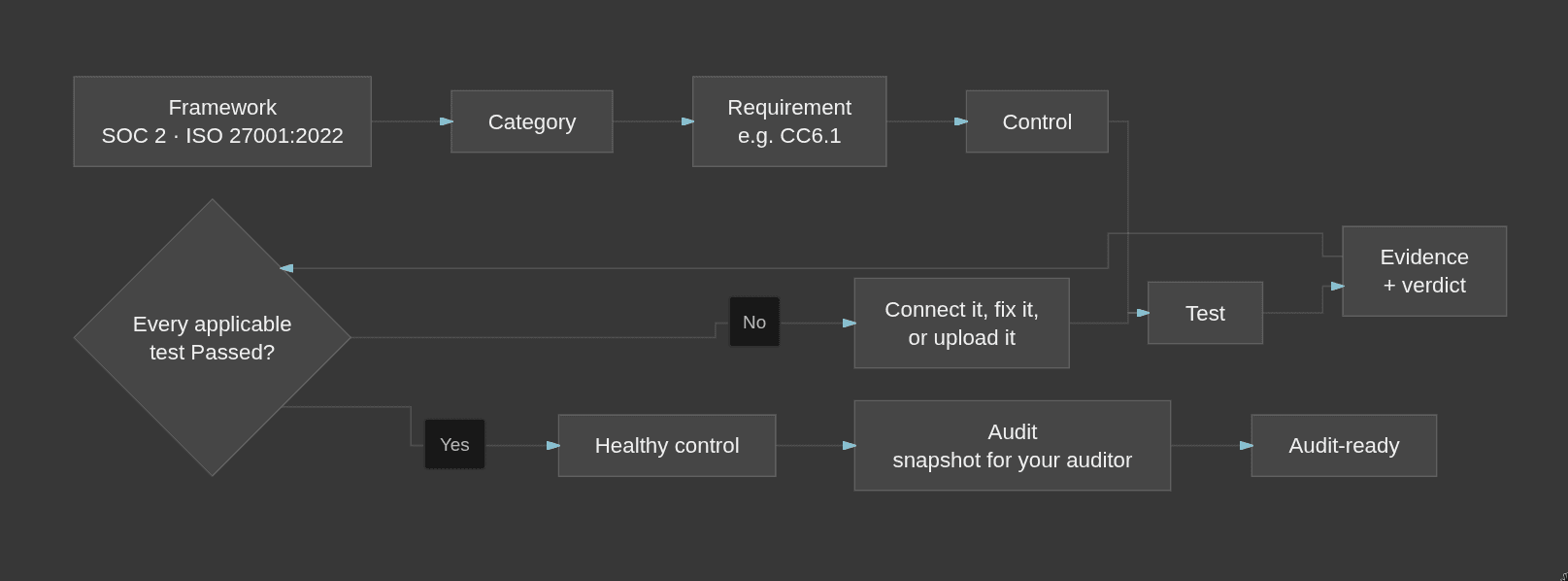
- Framework — the standard you're audited against. Multiple frameworks are supported today. You can run any number of Frameworks at once, and a control that serves both is one control, not two copies.
- Category — a group of related requirements, so you can work through a framework in sections instead of one long list.
- Requirement — one numbered line in the framework. SOC 2's are named CC1.1, CC6.1 and so on. The platform calls these Requirements everywhere.
- Control — the practice you actually put in place to meet requirements. One control usually covers several requirements, and often across multiple frameworks. A control is not a policy; policies are written documents you publish, and they live in their own area.
- Test — an automated check that a control is genuinely in place. Every control has one or more.
- Evidence — what a test found when it ran: a person, a repository, a cloud resource, an uploaded file. One piece of evidence can serve several tests, each with its own verdict. It attaches automatically when the test runs — there's nothing to link by hand.
Where evidence comes from: three kinds of test
Every test is one of three types, and the type tells you exactly what it needs from you.
- Integration — reads your security posture from a tool you've connected: cloud, identity, source code, ticketing, or endpoint protection. Connect the tool and these start answering on their own.
- Platform — reads records you maintain inside UprootSecurity: your policies, people, vendors, risks, devices, assets, and your organization profile. Keep those accurate and complete and these pass.
- Upload — a document you attach to that specific test. Nobody but you can supply it.
Reading a test result
A test lands on one of four statuses: Passed, Failed, Pending, or Not Applicable.
Pending is not a failure. It means there's nothing to evaluate yet — the source isn't connected, or the document hasn't been uploaded. It isn't neutral either: only Passed counts toward a healthy control, so Pending holds you short just like Failed does. It's usually the fastest thing to clear.
A control is healthy when every applicable test attached to it has Passed. Tests you've marked Not Applicable are excluded from the count. A requirement is healthy when all of its applicable controls are healthy. That's how your compliance percentage moves — one test at a time.
Tests re-run automatically every 24 hours. Owners and Administrators can also run a single test on demand when they've just fixed something. Uploading a document re-runs its test by itself, so don't go hunting for a Run button after you upload.
The audit
When you're ready, you create an audit against a framework, set the observation period, and assign your auditor. Creating it freezes a point-in-time snapshot — your auditor reviews a stable copy while your live compliance data carries on updating underneath. Your auditor records their verdicts and raises comments; you respond to them in the same place. You can export the evidence bundle and the audit report to hand over.
What we handle, and what you own
We do the mechanical work:
- Maintain the control, test and policy library, and the mappings between frameworks
- Run every test daily and gather the evidence
- Compute control and requirement health
- Pull posture from the tools you've connected, and pull in your employee list from your identity provider whenever you sync it
- Send the weekly summary
- Build the audit snapshot and the exports
You own the two things we can't do for you — access and judgment:
- Complete your organization profile
- Connect your tools
- Upload the documents for your Upload tests
- Publish your policies
- Assign owners, so every control and record has someone accountable
- Onboard your employees: accept policies, complete training, install the Uproot Agent
- Keep your vendor, risk and asset records real and current
- Make the judgment calls — deciding something is Not Applicable, and writing down why
That last one matters more than it looks. An auditor will accept a Not Applicable with a clear written reason and challenge one without.