
What your assistant can see — and what it can change
Your key acts as you. An AI assistant connected to UprootSecurity works inside your organization, with your role, and with the features your organization has enabled — never more. It sees what you'd see if you signed in, and it can change only what you could change.
Where your assistant's access comes from
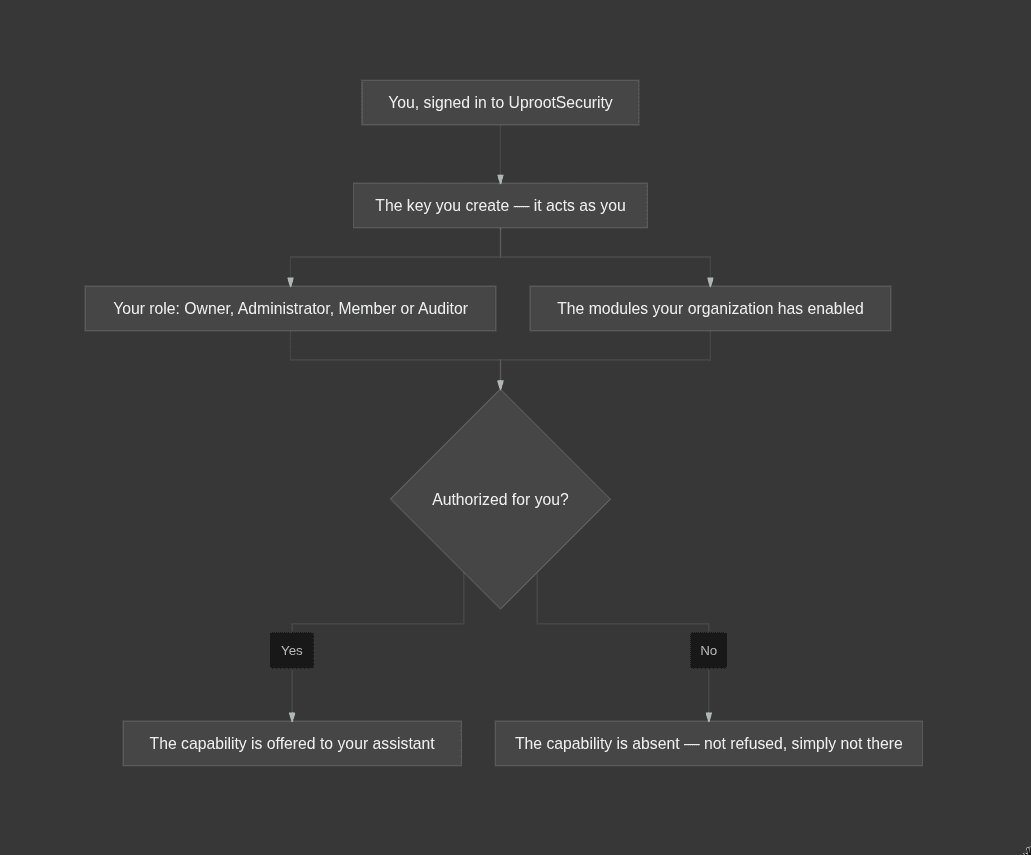
Every link in that chain is decided on our side, at the moment your assistant connects. Nothing about the assistant, the client you use, or how you phrase a prompt can widen it.
Why your colleague's assistant can do more than yours
Two people in the same organization connect exactly the same way and end up with different capabilities. That's the design, not a misconfiguration: capabilities you aren't authorized for are never handed to your assistant at all, so they're absent rather than refused. Your assistant won't say "you don't have permission" — it will say it has no way to do that. Most assistants call these capabilities tools, so you'll often see it phrased as a missing tool.
The practical consequence: if your assistant says it can't do something, that's usually your role or a module your organization doesn't have — not a bug. Why a capability is missing, or a request failed walks through the rest.
What it can read, and what it can change
If you can hold a key, your assistant can read whatever you can read. Changing anything depends on your role.
Your Role | What your assistant can do |
Owner | Read your compliance data, and change it — create and edit records, upload evidence, and move work forward through review, approval and publishing |
Administrator | Everything an Owner's assistant can do, with one exception — policies. It can work on the policies you own and send them for review, but approving one is the organization owner's call |
Member | Read only. It can look at anything you can look at, and change nothing |
Auditor | Read only — same as a Member |
Portal User | Nothing. Portal Users can't create a key, so there's no assistant access to grant |
Your modules narrow this further. If your organization doesn't have vendor management enabled, your assistant has no vendor capabilities — whatever your role says.
Policies narrow it once more, on ownership rather than role: you can work on the policies you own, and your organization's owner can work on any of them.
What it plainly cannot do
- Reach another organization. A key is bound to the organization you created it in.
- Act as another person. It is you, not a service account and not an admin override.
- Delete your tests, policies, vendors or risks. No such capability exists over this connection, for any role.
- See your conversations. The connection runs one way: your assistant calls UprootSecurity. Connecting does not hand us your chats or your prompts — only the requests your assistant makes to UprootSecurity, and what it puts in them, reach us.
Can I tell what it changed?
Yes, in the places you'd already look. Every record carries who changed it, and because your key acts as you, that's your name — an assistant's edit is your edit. A policy also keeps its full version history, so you can read back what each version said and who moved it along. Treat anything your assistant files exactly as you'd treat your own work: it's attributed to you, and you're accountable for it. What to keep human covers which calls shouldn't be delegated in the first place.
Your key is a secret that acts as you
Anyone holding your key has your access to your organization's compliance data, with no second factor in the way. Keep it in a password manager — not in a shared doc, a ticket, or a chat message. If it ever leaks, regenerate it: the old key stops working immediately, and every assistant still configured with it will fail until you paste in the new one.