
Setting the vendor risk level — and when to override the AI
The vendor's Risk Level is a manual field you own — AURA, the platform's AI analyst, pre-fills a suggested tier from four inputs you provide, but that suggestion is advisory and you can change it. The five tiers, lowest to highest, are Very Low, Low, Moderate, High, and Very High. No tier passes or fails any test, so set the one you can defend to an auditor — not the one that looks safe.
How AURA builds its suggestion
AURA generates a suggested tier once you've filled four inputs on the vendor form, each describing how you actually use the vendor. Fill them from what you know, not what's convenient — AURA can only reason from what you type.
- Data Classification — the sensitivity of the data this vendor handles. Pick the most sensitive class it touches: Public (openly shareable), Internal (for your company only), or Confidential (restricted or regulated).
- Data Accessed or Processed — a short, plain-language description of what data this vendor actually sees or handles. Be specific: "customer names and emails," "payroll records," "aggregate usage metrics only."
- Operational Impact — how much your business depends on this vendor. Choose Normal, Important, or Critical, where Critical means an outage would halt your product or operations.
- Access to Environments — which of your systems this vendor can reach. Select any that apply: Production, Staging, Development, or No Access. Production access is the single biggest driver of risk.
Once all four are set, AURA fills the Risk Level field with its suggested tier and shows a short reasoning. From there, the value is yours to keep or change.
When to override the AI
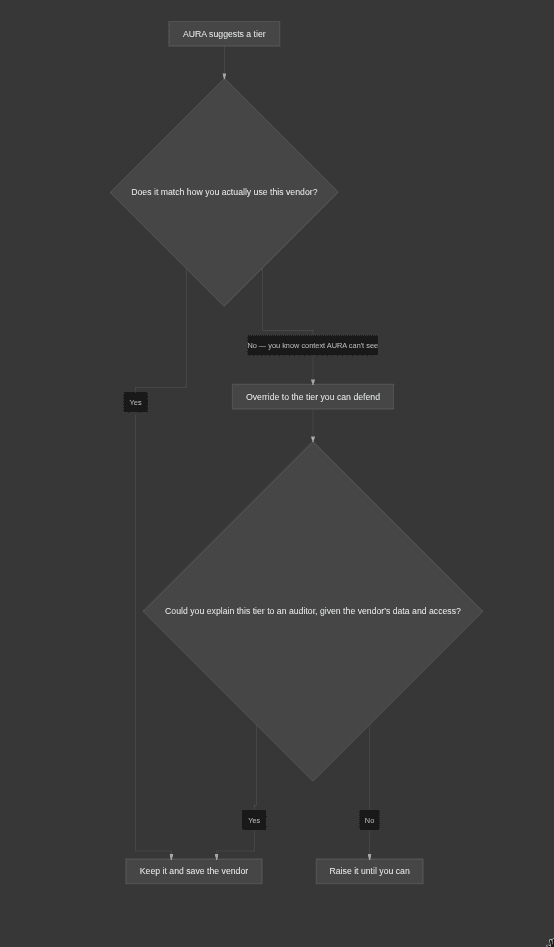
Override AURA whenever you know something its four inputs don't capture. It sees only what you typed — it can't know about a vendor's recent breach, a contract that lets them share your data onward, or a dependency that would take your product down. When your knowledge and the suggestion disagree, trust your knowledge and set a tier you can explain.
The one rule: keep it defensible. An auditor will question a Very Low on a vendor with production access and customer PII. If the tier would raise an eyebrow given how you use the vendor, raise the tier.
Examples
The tier follows how you use a vendor, not its name. Each case assumes the usage described.
- A cloud host running your production database with customer PII. High or Very High — keep AURA's high suggestion. It has production access and holds your customers' personal data; a low tier here is indefensible.
- An analytics tool AURA rated High because you described "user events," but the events are fully anonymized. Override downward — but only if you're certain the data can't identify anyone, and note why. Uncertainty means leave it higher.
- A vendor AURA rated Moderate that just gained production access this quarter. Override upward. AURA rated the inputs as they stood; you know the access changed. Update the environment input and let the tier follow, or set the tier yourself.
Why it matters / what your auditor expects
An auditor doesn't want the tool's opinion on vendor risk — they want yours, on record. That's the whole reason Risk Level is a manual field: a vendor risk assessment requires the customer's judgment, and the tier is where you record it. AURA gives you a fast, reasoned starting point so you're not staring at a blank field, but the accountable call is yours.
The Vendor risk level assessments test passes for every vendor as long as a tier is set — and because the field is required, every vendor always has one. So that test going green tells you nothing about whether your tiers are right. That check is on you: a defensible tier holds up under questioning, and a careless one is a finding waiting to happen.
Common mistakes
- Treating the AI suggestion as final. It seeds the field; it doesn't own it. Read the reasoning, then make your own call.
- Picking a low tier because you think it's "safer" for the test. No tier fails the test. A too-low tier only creates an audit problem later.
- Rating on the vendor's brand instead of your usage. A well-known vendor used for something trivial is low-risk; the same vendor with production access is not. The tier follows how you use it.
- Leaving the inputs vague. A thin "Data Accessed or Processed" gives AURA — and your auditor — nothing to reason from. Describe the actual data.