
Answer the questionnaire yourself or send it to the vendor?
CYou collect a vendor's security questionnaire one of two ways: answer it yourself in the platform, or share a link and let the vendor fill it out. Answer it yourself when the vendor is large or already publishes its security posture — a trust center, or a SOC 2 you can read. Send the link when the vendor is small and has nothing public to work from. An auditor accepts either, as long as the answers reflect real evidence and your review is on record.
How to decide
Both paths start from the review's questionnaire step. To answer it yourself, add the questions — from a ready-made template or generated for you — then answer each one in the platform and submit. To hand it off, copy the shareable link and send it to the vendor; they open it, answer, and submit.
Pick the path by how much the vendor already tells you publicly:
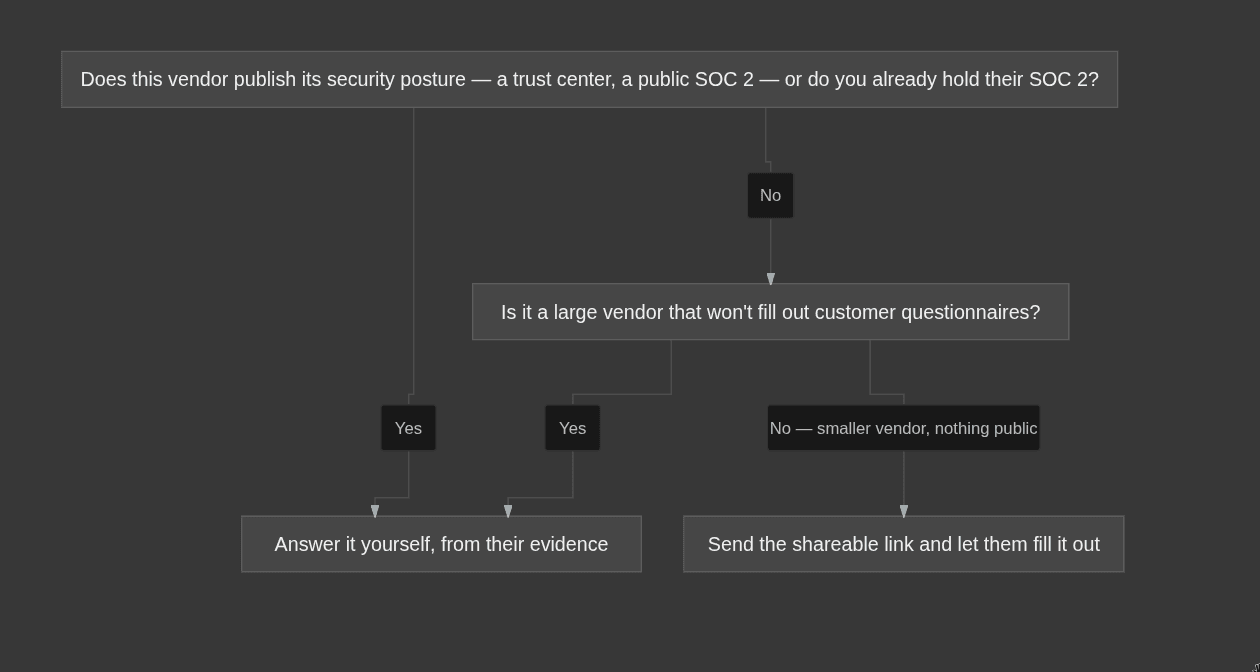
Large cloud and platform providers won't complete your questionnaire — they publish a trust center and a SOC 2 instead, and expect you to work from those.
Answering it yourself, credibly
Answering it yourself doesn't mean guessing. Base every answer on evidence you can point to: the vendor's trust center, their published security or compliance page, or a SOC 2 report you already hold. That's the difference between a defensible answer and a filled-in blank — you're recording what their documentation says, not what you assume.
Examples
- A major cloud or infrastructure provider with a public trust center. Answer it yourself. A vendor at that scale won't complete your questionnaire, but everything you need is already public — work from their trust center and the SOC 2 you can download, and answer each question from those.
- A small, niche tool with no security page and no published report. Send the link. There's nothing public to answer from, and a smaller vendor is far more likely to actually fill it out — their own answers become your evidence.
- A vendor you sent the link to that's gone quiet. Don't let it stall the review. Switch to answering yourself from whatever they do publish, or complete the review on an uploaded report instead — a half-finished questionnaire blocks completion, and you're not obligated to wait on them.
How the questionnaire fits review completion
A questionnaire only counts toward completing a review once it's fully answered and submitted — the review then shows it as Closed / All questions answered. A questionnaire that's still open blocks you from completing the review, even if you've already uploaded a report. So if you send the link and the vendor never finishes, the review stays stuck.
You don't always need a questionnaire, though. An uploaded report on its own can complete a review. If a vendor won't answer and won't share a questionnaire, upload their SOC 2 (or another report) and complete the review on that instead. See Completing a vendor review for the full completion rule, and Collecting vendor security reports for how to get a report when a vendor won't engage.
Why it matters / what your auditor expects
An auditor doesn't care who typed the answers — they care that you assessed the vendor and the assessment is on record. A questionnaire you answered yourself from the vendor's public evidence is just as valid as one the vendor filled out, because both capture your documented judgment about that vendor's security. What makes it hold up is the evidence behind each answer, not the sender. Completing the review — by closing the questionnaire or uploading a report — is also what keeps your Vendor security reviews test green.
Common mistakes
- Waiting on a big vendor to fill out your questionnaire. Large providers don't. Answer it yourself from their trust center and SOC 2, and move on.
- Leaving a questionnaire open while relying on an upload. An open questionnaire blocks completion even when you've uploaded a report. Either finish and submit it, or don't start one and complete the review on the upload alone.
- Answering from guesswork. An answer with no evidence behind it is worse than no answer — base each one on the vendor's documentation.